
- Training
- Service
- Promotion
- Schedule
- Testing Center
- News
- Contact
7/9/2019


With the eyedropper tool in PowerPoint you can match the color from a shape or picture to another element of your presentation for a more cohesive look.
Select and apply a color with the eyedropper tool
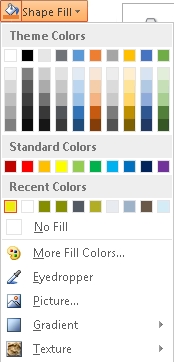
The mouse pointer turns into an eyedropper tool.


For a more accurate way of getting the exact color you want when many colors are clustered together, select the color by pressing Enter or spacebar instead.
Tip: You can also match colors from elsewhere on your screen. After clicking Eyedropper, click and hold the mouse button as you drag your mouse to the color you want to match. The eyedropper tool disappears when you move outside the PowerPoint window, but the color will still preview and be matched.

12/11/2025


