
- Training
- Service
- Promotion
- Schedule
- Testing Center
- News
- Contact
3/9/2026


Imagine you had to pick only 5 Excel Functions to solve most spreadsheet problems. Which ones would you keep?
I picked five functions that together replace a large number of smaller, niche functions. These choices focus on common tasks: lookups, logical tests, statistics, reporting, formatting, and data cleanup.
5 Excel Functions – BEGIN – Excel Campus.xlsx
5 Excel Functions – FINAL – Excel Campus.xlsx
My goal was simple. Pick functions that handle everyday data-analysis work. Each function should be versatile and combine multiple tasks into one formula.
I grouped needs into five categories. Each category gets a single function that handles most scenarios. That makes it easier to learn and to build reliable spreadsheets.
FILTER is the single function I use for lookups and many logical tests. It returns matching rows or values from an array based on criteria you set.
Why FILTER makes the cut
|
=FILTER(I5:J20,G5:G20=B10) |
Common uses
Here are typical scenarios where FILTER replaces other functions.
FILTER for Logical Tests
Filter can also be used in place of logical functions like IF or IFS. It can even handle AND and OR logic for multiple conditions.
The filter criteria below tests if the sales amount is greater than or equal to values in the minimum range and less than or equal to values in the maximum range, and returns the bonus amount.
|
(SalesAmount>=MinRange)*(SalesAmount<=MaxRange) |
FILTER is a very versatile function that should be in every Excel user's tool belt.
AGGREGATE is the statistical workhorse I chose. It handles sum, average, count, and many other calculations, and it includes options to ignore hidden rows and errors.
Why AGGREGATE belongs in the 5 Excel Functions
How AGGREGATE works
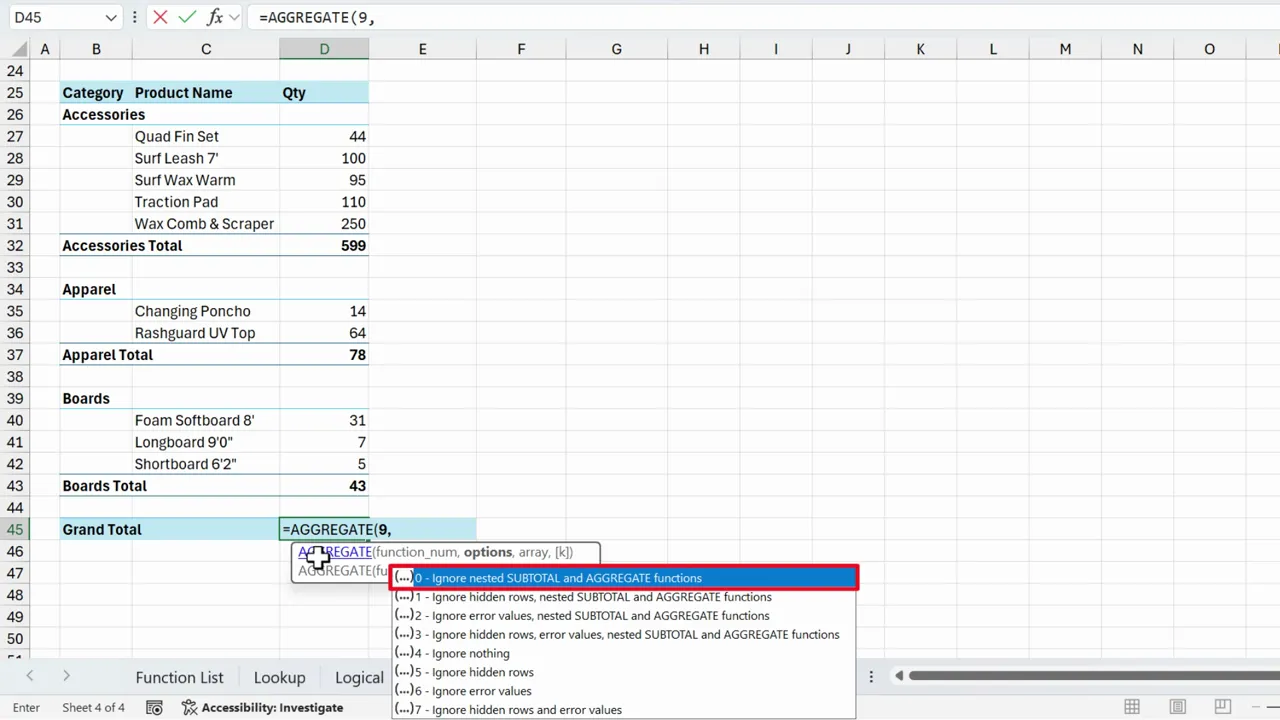
AGGREGATE takes a function number, an option number for what to ignore, and the array or range. The option lets you choose whether to ignore hidden rows, errors, or nested functions.
When to prefer AGGREGATE
Limitations
AGGREGATE can feel heavy when you only need a simple SUM or COUNT.
PIVOTBY creates pivot-like summaries inside the grid. It builds cross-tab reports with a single function. It returns unique row and column headers and performs aggregation for each intersection.
Why PIVOTBY is part of the 5 Excel Functions
Practical benefits
When to still use a PivotTable
PivotTables are powerful and user-friendly. They are still the best choice for complex, interactive reporting. Use PIVOTBY when you want formula-based outputs or programmatic control inside the worksheet.
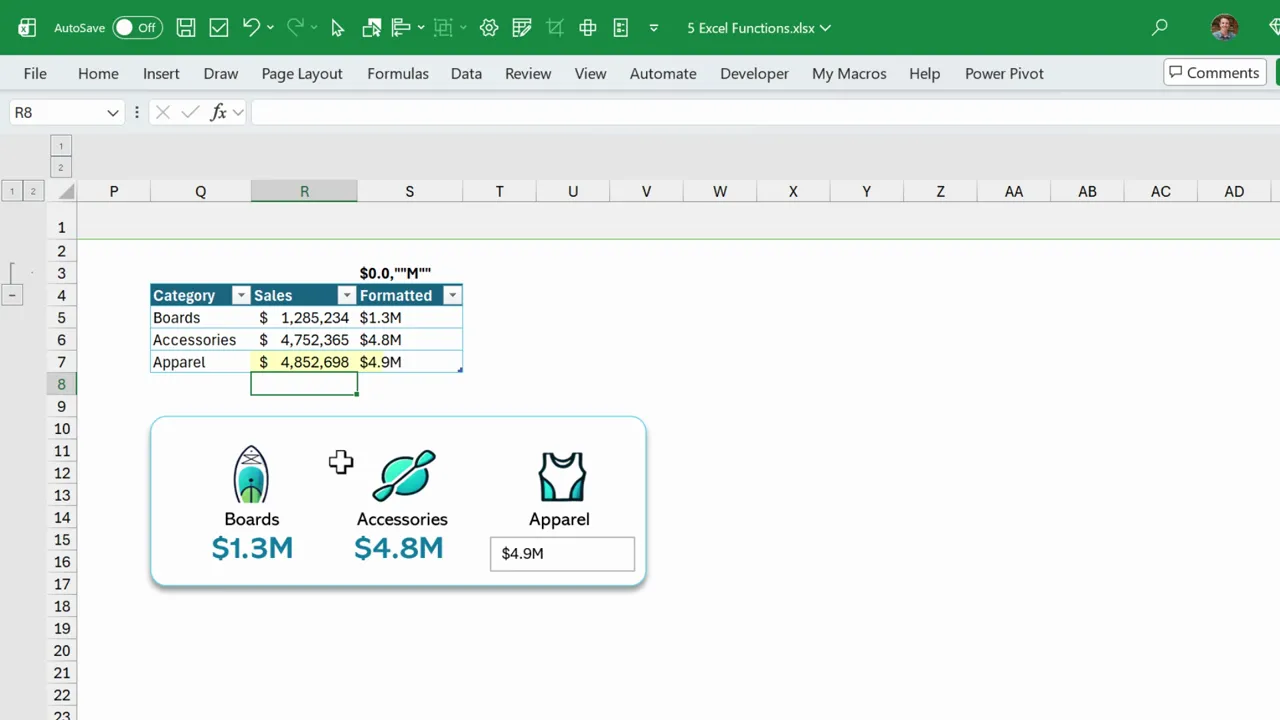
TEXT converts numbers and dates into custom text formats. It is surprisingly flexible for grouping by month, producing labels, and creating formatted strings on dashboards.
Why TEXT makes the shortlist of 5 Excel Functions
Examples
You can link a text box to a formatted cell so the visual label updates automatically. That is handy for scorecards and dashboards.
Tips
REGEXEXTRACT pulls parts of text using regular expressions. It replaces many text functions by matching patterns rather than relying on position.
Why REGEXEXTRACT is one of the 5 Excel Functions
How to use REGEXEXTRACT
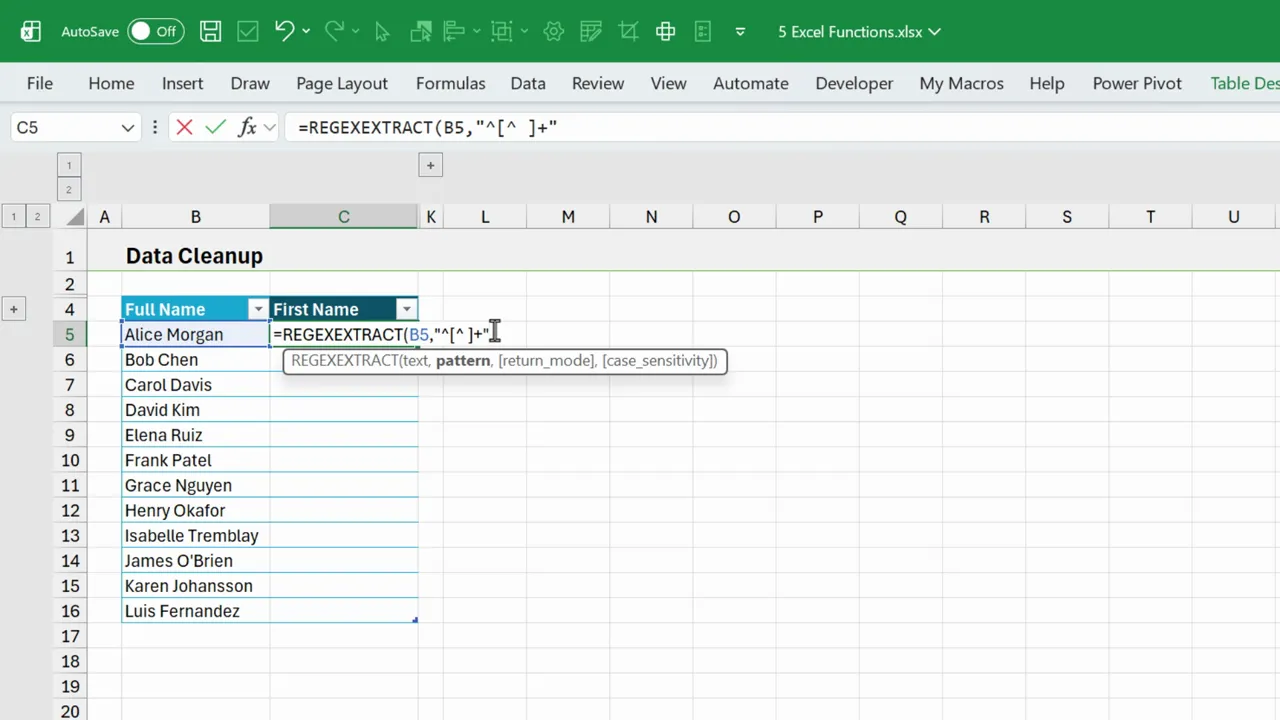
For example, to get the first name before the first space you could use a pattern that captures characters up to the space. If building the pattern feels hard, there are quick ways to get started.
How to build patterns faster
REGEX brings a small learning curve, but it pays off with major flexibility for messy data. Plus, we can have AI write the regex codes and patterns for us.
Choosing only 5 Excel Functions forces you to pick versatile tools. FILTER, AGGREGATE, PIVOTBY, TEXT, and REGEXEXTRACT cover lookups, statistics, reporting, formatting, and cleanup.
They are not perfect for every edge case. But together they replace many niche functions and reduce complexity. Learning these five gives a powerful foundation for everyday spreadsheet work.
Source: excelcampus.com

12/11/2025


