
- Training
- Service
- Promotion
- Schedule
- Testing Center
- News
- Contact
8/12/2020


An event is an activity that lasts 24 hours or longer. Examples of a events include trade shows, seminars, and vacations.
By default, events and annual events don’t block your calendar and show your time as busy when viewed by other people. The block of time for an all day event is typically shown as free.

In a Microsoft 365 organization or an Exchange organization, others within your organization can see your calendar details. Marking an event private hides those details from everyone other than you and any others in your organization to whom you've granted read permissions to your calendar or to your mailbox. For example, marking an event private will not hide its details from anyone with delegate access to your calendar or who has Send As permissions for your mailbox.
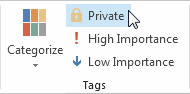
Important: You should not rely on the Private feature to prevent other people from accessing the details of an event, contact, or task. To make sure that other people can’t read the item that you mark as private, don’t grant them read permission to your Calendar, Contacts, and Tasks folders. A person who is granted read permission to access your folders can use programmatic methods or other email applications to view the details of a private item. Use the Private feature only when you share folders with people whom you trust.

12/11/2025


