
- Training
- Service
- Promotion
- Schedule
- Testing Center
- News
- Contact
6/7/2022


A page in Power Pages is a webpage, a container for content that's identified by a unique URL in a website. A page is one of the core objects of the website. The parent and child relationships among pages build the hierarchy of a website.
Create a page
The Pages workspace enables you to design and build webpages with in-context editing and add content with no-code and low-code widgets such as text, image, video, Power BI reports, lists, forms, and others.
1. Open the design studio to edit the content and components of your Power Pages site.
2. On the left pane, select Pages, and then select one of the plus signs (+).

3. Choose a page from standard layouts or choose a custom layout.

Power Pages is built on the foundation of Power Apps portals. Many of the tools and methods used to configure Power Pages use the functionality of Power Apps portals.
4. Add content and components to your page.
Preview a page
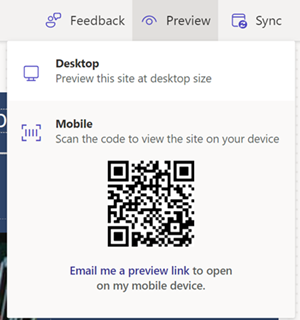
You can preview your site by selecting Preview from the command bar. Select Desktop to preview your page in a browser or scan the QR code to view the page on a mobile device.
Soucre: https://docs.microsoft.com

12/11/2025


