
- Training
- Service
- Promotion
- Schedule
- Testing Center
- News
- Contact
5/31/2022


Power Pages provides a list of templates to choose from to quickly build your site. Customize and design your site using the new Power Pages design studio. Choose a default template to build your site or use scenario-based templates to accelerate creating your site.
1. Go to Power Pages.
The first time you visit the site, you'll be presented with a Get started button and be able to sign up for a free, 30-day trial.
2. On the home page, select Create a site.

3. Select Default design template, and then select Select template.
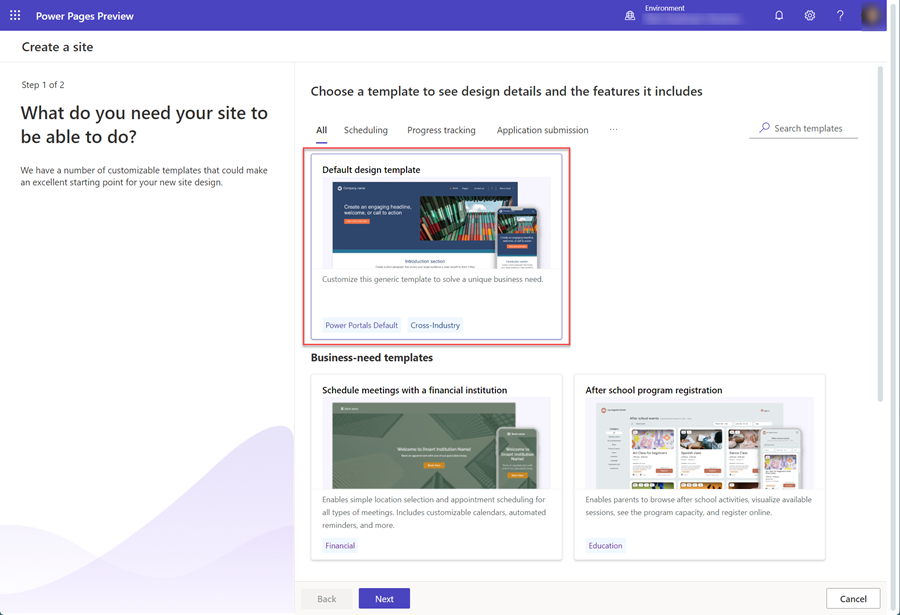
|
Note The default site is generic and can be modified for various business scenarios. You can also choose a business-need template that best matches your specific scenario. |
||
4. Validate the default site name and web address that have been created, and then select Done.

|
Note It might take a few moments for your new site to be provisioned. You'll be able to modify the name and web address later. |
||
5. After the site is created, you can begin to edit or preview your site.

Source: https://docs.microsoft.com

12/11/2025


