
- Training
- Service
- Promotion
- Schedule
- Testing Center
- News
- Contact
8/12/2020


If you want to invite someone to a meeting you haven't organized, you can forward the meeting to them. When the recipient receives the meeting request, it appears to come from the meeting organizer and the meeting organizer receives notification that you forwarded the meeting.
To forward a meeting or meeting series that’s on your calendar:

If you're the meeting organizer, the easiest way to invite someone else to a meeting is to open the meeting from your calendar and add them as an attendee.
After you've added the additional attendees, click Send Update. You can choose whether to send the update only to added or changed attendees or to all attendees.
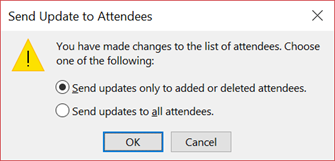
When you use Outlook to forward a meeting to someone that was not originally invited to the meeting, Outlook sends a meeting forward notification to the meeting organizer.
The existing meeting attendees are not notified about the added attendee.
You cannot Cc or Bcc an individual on a meeting request. You can, however, add recipients as optional attendees.
.png)
4. Send the meeting invitation.

12/11/2025


