Power Pages capabilities
5/30/2022
You can quickly create and design professional and secure sites for your business with Power Pages. This article provides an overview of key Power Pages capabilities.
Simplified authoring experience for makers
Quickly create new sites directly from the Power Pages home page by using the default template or choose existing industry-based starter templates.

Design studio
Makers can build powerful and engaging sites without writing a single line of code.
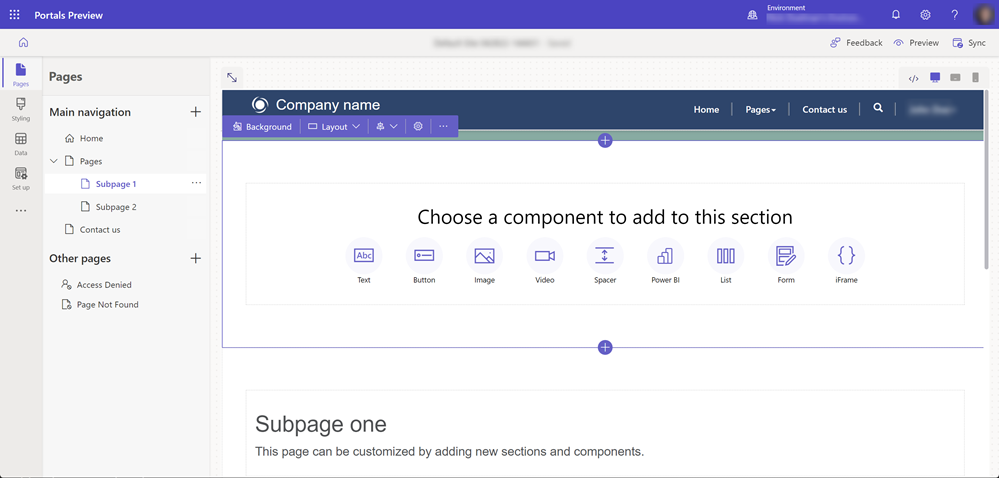
The new and enhanced design studio provides the following workspaces:
- Pages workspace for creating, designing, and arranging webpages
- Style workspace for applying styles and themes to your site
- Data workspace for creating and modifying Microsoft Dataverse tables used in data-driven web applications
- Setup workspace for administration and site management
Responsive rendering
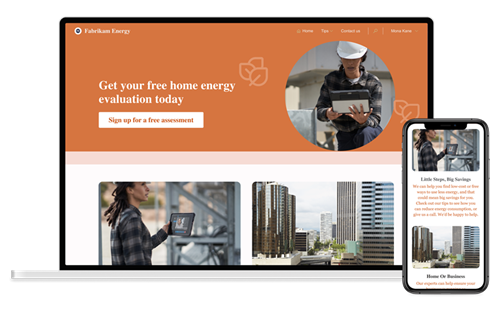
Power Pages is based on Bootstrap, which natively provides support for building websites that are responsive, mobile-friendly, and available in various form factors.
Advanced development capabilities for pro developers
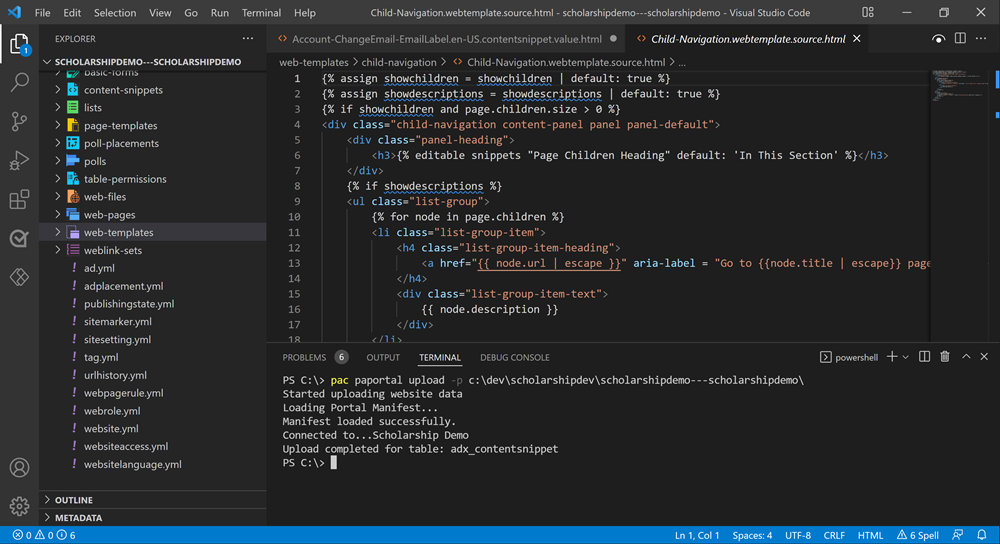
Makers can work with pro developers in fusion teams to extend the functionality using Visual Studio Code and the Microsoft Power Platform CLI to create powerful business application websites.
Security and governance
Power Pages inbuilt security is its core. It allows organizations to securely enable access of their business data to their users (internal or external) through Power Pages authorization rules.
- Organizations using Power Pages can choose from various authentication providers or allow access to site content anonymously.
- Power Pages is hosted as Azure App Service, which has International Organization for Standardization (ISO), System and Organization Controls (SOC), and Payment Card Industry Data Security Standards (PCI DSS) compliance.
- Power Pages supports modern TLS crypto standards (TLS 1.2) and has built-in Azure DDoS protection. It also supports dynamic IP restriction to limit traffic from bad actors and provides secure, configuration-driven mechanisms for admins to address top web security vulnerabilities such as injection attacks, cross-site request forgery, and server-side request forgery.
- You can also configure Power Pages to use edge caching and web application firewall (WAF) capabilities.
Power Pages provides some helpful tools for administrators to manage the administration and lifecycle of their sites and environments.
Integration with other Microsoft Power Platform components
Power Pages provides deep integration with other Microsoft Power Platform components.
- Dataverse enables users to secure store and manage data that's used by business applications and your Power Pages sites. Use model-driven app constructs like forms, views, charts, and dashboards to easily surface Dataverse data.
- Power Apps enables anyone to create no-code/low-code custom mobile and web apps to share and collect data and streamline business processes. Using Power Apps to create an app that uses SharePoint to store content is a popular way to quickly build basic intranet sites, whereas Power Pages is ideal for websites focused on external audiences that require more secure access to your business information.
- Power Automate simplifies the creation of automated workflows. With Power Pages, use Power Automate for plug-ins, workflows, automated cloud flows, or to extend business logic and interact with data and events coming and going in and out of Dataverse.
- Power BI allows anyone to access seemingly immersive and interactive insights from business data. With Power Pages, integrate with Power BI to access components like reports, dashboards, and tiles. Use the embed capability to surface data that sits outside of Dataverse.
- Power Virtual Agents enables teams to easily create and publish AI-driven chatbot experiences. With Power Pages, add chatbots to your external-facing websites for a myriad of business purposes.
Source: https://docs.microsoft.com


