
- Training
- Service
- Promotion
- Schedule
- Testing Center
- News
- Contact
6/10/2022


The Power Pages design studio is an intuitive interface that enables low-code makers to build and configure rich business web apps.
1. Go to Power Pages.
The first time you visit the site, you'll be presented with a Get started button and be able to sign up for a free, 30-day trial.
2. Select your site and select Edit to launch the design studio.

3. If you don't have a site created, select Create a site to create your website.
The design studio has four marquee experiences—called workspaces—that focus on specific user jobs:
Preview your site
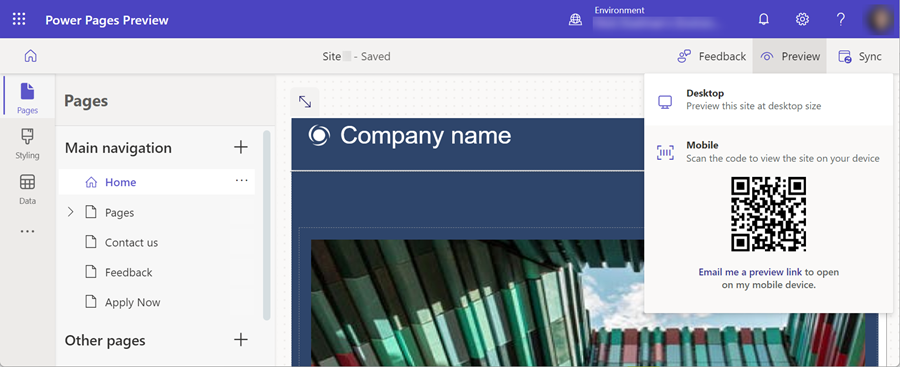
When you're done building, preview your site by using the Preview option. You can preview on desktop or mobile. Selecting Desktop opens the site in a new web browser tab. Scanning the QR code with your mobile device opens the site on the mobile web browser.
Accessing the Portal Management app and sync
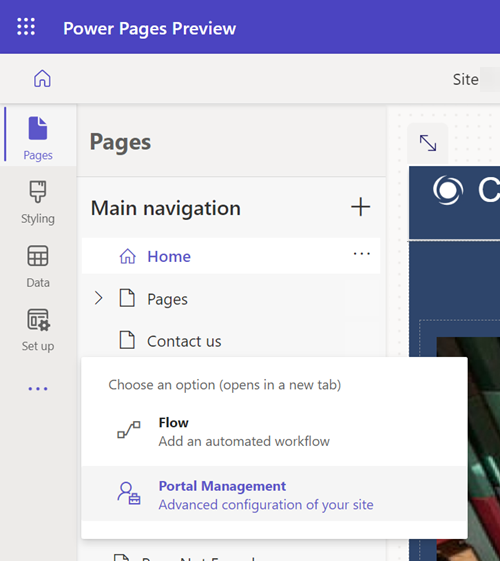
For advanced configurations that aren't available in the Power Pages design studio, the Portal Management app is accessible from the overflow menu.
To reflect changes made to the site from the Portal Management app to the Power Pages design studio, select Sync in the upper-right corner of the screen.

Source: https://docs.microsoft.com

12/11/2025


